Install Database Server (PostgeSQL)
STEP 1 : INSTALLATION OF POSTGRESQL DATABASE SERVER FOR VMS SQL
Install the main database server. One server needs to be in the network for all VMS software to connect to. If there is only one computer as a standalone, the server can be installed in the same computer as the VMS software.
Please download the database server and database managers from the below links:
Download Database
Download PGADMIN4
Step 1 : Setting up the database
Run the installer and keep the default settings
PostgreSQL-9.6.2-1a-win64-bigsql.exe


Set a password for database server
IMPORTANT - do not loose the password
Will be used by VMS software for connection Click finish to complete the installation
STEP 2 : INSTALLATION OF POSTGRESQL ADMIN SOFTWARE
Install the Database Admin software on the same pc. This software is used to create the database for the VMS software
Run the installer and keep the default settings
pgadmin4

Once installed Launch pgAdmin 4
______________________________________________________________________________________________________________________
Step 2: Creating the database


Connect to database
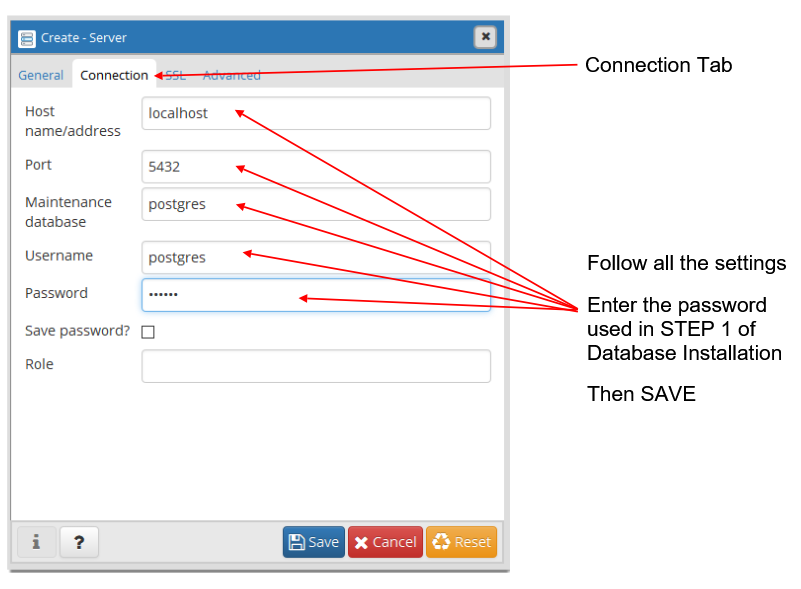
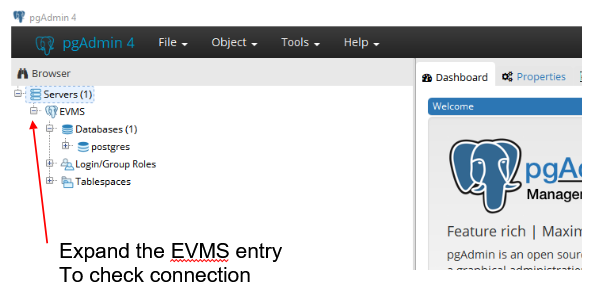
Now the pgAdmin software should be connected to the Database Server
_________________________________________________________________________________________________________________________
Step 3: Creating the database tables EVMS and EVMSAUDIT


*******
Repeat the step 3 above and create EVMSAUDIT database the same way as EVMS