Login Page
To launch the Login Page for MyVisitor QR Code System either type the given
URL directly into the browser or launch it from the set icon on the device home screen.
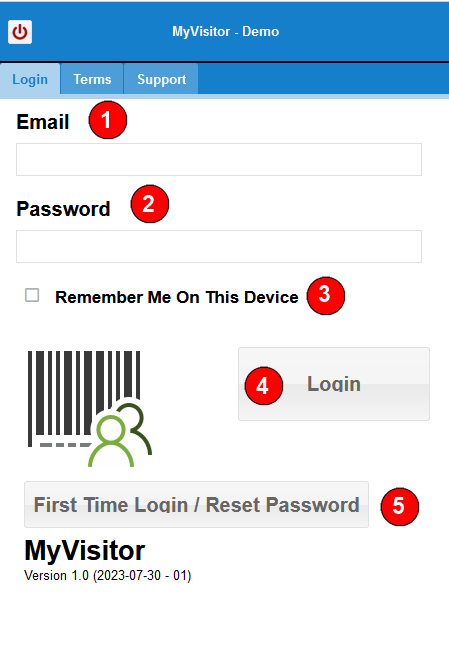
The host Email will be registered in the MyVisitor QR Code System.
The host will need to create passwords before the system can be used.
1) Email Address - registered email address that was given to Management Admin
2) Password - needs to be set by host using the First Time Login Button (refer to no.5 - First Time Login button)
3) As an option, once the host has set the Email and Password,
check the Remember Me On This Device check box. The MyVisitor QR Code system will
remember the device id and auto login the next time the application is launched.
Note : if there is an update, the browser or the browser data is cleared, this setting may
be lost.
4) Once the correct Email and Password have been entered, use the Login button to proceed
to the Main Menu.
5) Use this button to create a password for first time login or the reset password.