Activating Your License
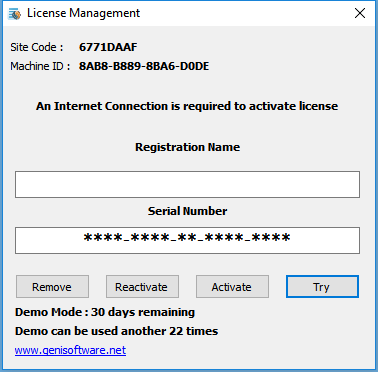
The License Management form will appear during demo mode.
Use this form to activate your software with the serial number provided upon purchase.
Use your name or company name for the registration name.
First time activation click ACTIVATE button
If you wish to move your license to another computer, you can use the same form
to enter your serial number and click REMOVE. This will free up the serial number
to be activated on another computer.
If you should change Hard Drive or Reformat you PC, you may use the REACTIVATE button
to reactivate the license on the same computer.
All the above functions require an Internet Connection.